


- April 15, 2025
- J.RAZ
- (0)
- Free online offers, Uncategorized
I highly recommend this free program for securing your PC
Discover Hardentools, a free program for securing your PC. Learn how to use Hardentools step-by-step to protect your system from cyber threats with ease.
Introduction
In today’s digital world, your computer is constantly exposed to various online threats. From malware and spyware to ransomware and phishing attacks, the risks are endless. That’s why using a free program for securing your PC is no longer optional—it’s essential. If you’re looking for a lightweight, effective, and easy-to-use solution, Hardentools might just be the tool you need. This article will show you how to use Hardentools in detail and explain why it’s one of the most trusted tools for enhancing computer security without unnecessary complexity.
What is Hardentools?
Hardentools is a free program for securing your PC developed by Security Without Borders, a collective of cybersecurity professionals. Its purpose is simple but powerful: to reduce the attack surface of your Windows operating system by disabling risky features and services that are often exploited by malware.
Unlike bloated antivirus software, Hardentools focuses on hardening the system by disabling functions like Windows Script Host, macros in Office files, and other potentially dangerous tools that everyday users rarely need. This makes Hardentools perfect for anyone looking to lock down their system quickly without a steep learning curve.
Why Use Hardentools?
There are countless reasons to use a free program for securing your PC, but here are the main advantages of using Hardentools:
Free and Open Source – No hidden costs or subscriptions.
Easy to Use – Simple one-click interface.
Portable – No installation required.
Reversible Changes – All modifications can be undone.
Focused Security – Targets real-world vulnerabilities used in attacks.
For those who want peace of mind without investing in expensive software, Hardentools is a must-have free program for securing your PC.
How to Download Hardentools
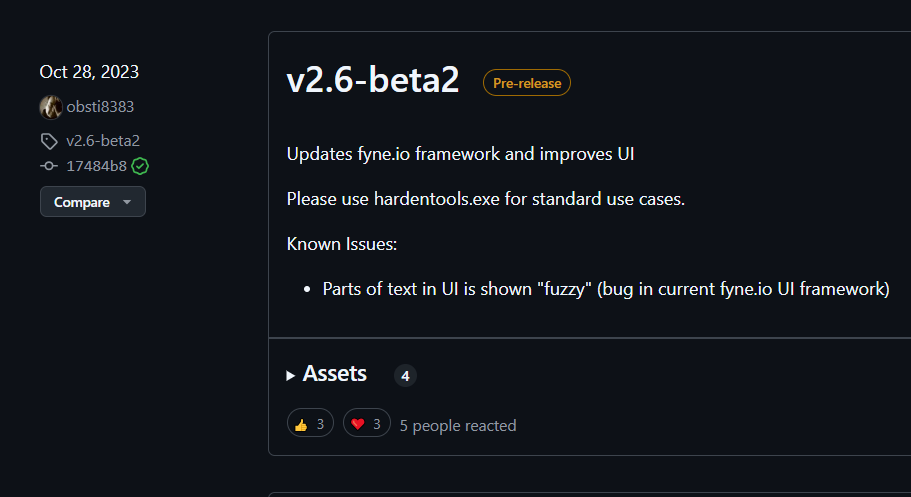
Using Hardentools starts with a safe and straightforward download process. Here’s how to do it:
Visit the official GitHub repository by Security Without Borders.
Look for the latest release of Hardentools.
Download the ZIP file containing the executable.
Extract the ZIP to a folder on your desktop or anywhere convenient.
You’re now ready to run this free program for securing your PC.
Make sure you download Hardentools only from the official source to avoid counterfeit versions that may contain malware.
How to Use Hardentools – Step-by-Step Guide
Now, let’s walk through how to use Hardentools, step by step:
Step 1: Run the Program
Double-click the
Hardentools.exefile from the extracted folder.If prompted, allow the app to make changes to your device.
You’ll see a clean, minimal interface with a large “Harden” button.
Step 2: Click “Harden”
Once you click “Harden,” Hardentools will start applying its security tweaks.
A list of actions will be displayed, such as disabling macros, VBScript, AutoRun, and more.
Wait a few seconds until the process is complete.
Congratulations—you’ve just used Hardentools, the best free program for securing your PC, in just one click!
What Exactly Does Hardentools Disable?
This free program for securing your PC disables or tweaks the following features:
Windows Script Host (WSH)
PowerShell script execution
Office Macros
Windows Autoplay and AutoRun
Remote Desktop Protocol (RDP) for non-administrators
Windows Subsystem for Linux
Internet Explorer (IE) as default browser
Certain pre-installed Microsoft Store apps
By disabling these features, Hardentools helps to prevent malware and ransomware from exploiting system-level functions to gain control of your device.
Who Should Use Hardentools?
Hardentools is a great free program for securing your PC, but is it right for you?
You should definitely consider using Hardentools if you:
Are a journalist, activist, or researcher handling sensitive data.
Use your PC for work or finance and want extra security.
Are a regular user who doesn’t need advanced Windows features.
Want to avoid spyware and malware without bloated antivirus software.
Because all changes made by Hardentools can be reverted, you can test its features worry-free. If you ever need to re-enable a function, just reopen the app and click “Undo.”
How to Undo Changes in Hardentools
Sometimes, you may need access to a disabled feature—such as running a macro in an Office file from a trusted source. Here’s how to revert the changes made by this free program for securing your PC:
Open
Hardentools.exeagain.This time, you’ll see an “Undo” button instead of “Harden.”
Click “Undo,” and the tool will roll back all security changes.
Restart your PC if prompted.
Reversibility is one of the reasons why Hardentools is considered the best free program for securing your PC—you’re always in control.
Advanced Use: Running Hardentools in Professional Environments
IT admins and security professionals can use Hardentools in environments like schools, NGOs, and corporate offices. Since it’s portable and doesn’t require installation, Hardentools is perfect for deployment via USB sticks or centralized administrative tools.
For such users, the GitHub repository even contains scripts and documentation to help integrate Hardentools into larger cybersecurity strategies, making it not just a free program for securing your PC, but also an asset for team-wide defense systems.
Important Considerations Before Using Hardentools
While Hardentools is incredibly helpful, here are a few points to keep in mind:
Some productivity tools may stop working as expected (e.g., Office macros).
If you’re a developer or sysadmin, you may need features like PowerShell or WSL that Hardentools disables.
Always read the documentation before applying or undoing changes.
With these tips, you’ll get the most out of this powerful free program for securing your PC without running into avoidable issues.
Alternatives to Hardentools
If you’re curious about what else is out there, here are some other free programs for securing your PC:
O&O ShutUp10++ – For privacy-focused hardening of Windows 10/11.
Simple Windows Hardening – Lightweight tool focused on telemetry blocking.
Microsoft Defender – Built-in antivirus with decent protection.
However, none of these options match the simplicity and purpose-driven design of Hardentools.
Testimonials: What Users Are Saying
Thousands of users around the world rely on Hardentools as their primary free program for securing your PC. Here’s what a few of them had to say:
“Hardentools helped me feel safe online again. No frills, just security.” – James K.
“As a journalist, I use Hardentools on every work laptop I own.” – Lina M.
“I’ve tried dozens of tools. Hardentools is the one I recommend to non-techies.” – Andre D.
These testimonials show that Hardentools delivers on its promise as a powerful yet accessible free program for securing your PC.
Final Thoughts
There are many tools out there promising to keep you safe, but Hardentools stands out because it’s:
Free
Open-source
Reversible
Easy to use
Whether you’re a casual user, journalist, freelancer, or IT professional, you’ll benefit from this trusted free program for securing your PC. In just one click, you can make your system significantly more resilient against common cyber threats.
Summary
If you want peace of mind and don’t want to deal with complex software or expensive licenses, Hardentools is your go-to free program for securing your PC. With a simple interface and reliable security tweaks, it helps lock down your system from real-world threats. And the best part? You can undo everything with a single click.
For anyone looking to take control of their digital security, Hardentools is the smartest and safest choice available today.
Click here to go to Hardentools.




Leave a Reply